Overview

Purpose
Create a secure connection for remote service from a Windows computer to a NOA edge device.
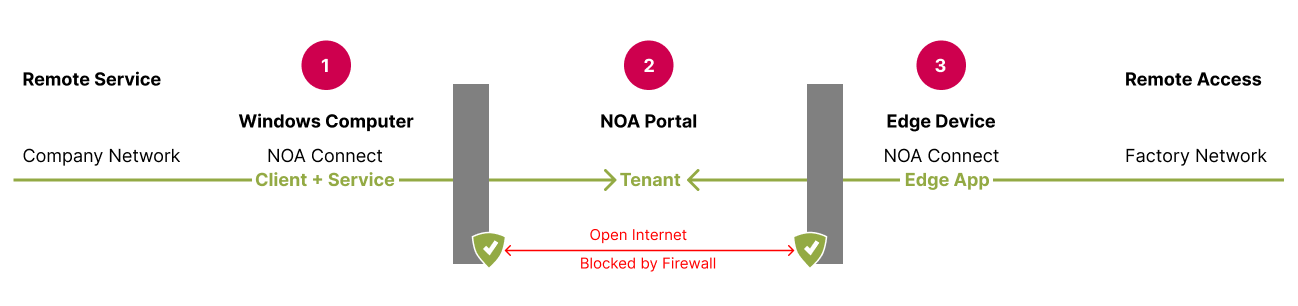
NOA Connect opens a secure connection between two parties: Windows computer and edge device. Both parties only use outgoing communication (https and wss). NOA Connect builds a VPN tunnel inside this connection, to ensure end-to-end encryption.
- Windows computer in the company network for remote service. It has NOA Connect client and service installed
- NOA tenant in the NOA Portal. The tenant mediates the secure connection.
- Edge device that enables remote access to the factory network. It has NOA Connect app installed
Set up NOA Connect
- Get an account for NOA Portal and register the edge device in a tenant, see Add a Device
- In NOA Portal: Set up the tenant to enable remote access
- On the edge device: Install the NOA Connect app via the App Manager
- On the Windows computer: Install NOA Connect Windows application
To initiate a remote session from the Windows computer run the client.